

Iterator#
Iterating over topological and structural attributes of a molecular system.
MolSysMT provides a convenient tool to iterate over topological and structural attributes of a molecular system. This tool — the class molsysmt.basic.Iterator — supports standard control arguments like start, stop, step, and chunk, regardless of the attribute type.
:class: dropdown
Visit the section Attributes for a detailed overview of attributes in MolSysMT.
:class: dropdown
Basic usage#
Let’s show how this class works with demonstration datasets (chicken villin HP35 and pentalanine):
Iterations over topological attributes#
Suppose we want to iterate over topological attributes such as atom_name or group_index.
The class molsysmt.basic.Iterator is designed for this purpose.
Have a look to the following code:
import molsysmt as msm
molsys = msm.systems['chicken villin HP35']['1vii.bcif.gz']
Note
Demo Systems Catalog
This tutorial uses demonstration datasets provided by MolSysMT. To explore the full catalog of bundled systems, forms, and file paths, visit the Demo Systems guide.
iterator = msm.Iterator(molsys, selection='atom_name=="CA" and group_index<10',
                        atom_index=True, atom_name=True, group_index=True, group_name=True)
Tip
All objects defined in the molsysmt.basic module can also be invoked from the main level of the library. Hence, molsysmt.Iterator is the same class as molsysmt.basic.Iterator.
for atom_index, atom_name, group_index, group_name in iterator:
    print(atom_index, atom_name, group_index, group_name)
[0] ['N'] [0] ['MET']
[1] ['CA'] [0] ['MET']
[2] ['C'] [0] ['MET']
[3] ['O'] [0] ['MET']
[4] ['CB'] [0] ['MET']
[5] ['CG'] [0] ['MET']
[6] ['SD'] [0] ['MET']
[7] ['CE'] [0] ['MET']
[8] ['H1'] [0] ['MET']
[9] ['H2'] [0] ['MET']
The class molsysmt.basic.Iterator allows us to work with a loop running over a selection of atoms. The set of attributes we want to extract are introduced together with the rest of instantation arguments in a similar way they are indicated in molsysmt.basic.get(). But, is the iterator only running over atoms? Not at all. The element argument can be set to other leves such as group, component, chain, molecule or entity. Check this next case:
iterator = msm.Iterator(molsys, element='group', selection='molecule_type=="peptide"',
                        group_index=True, group_name=True)
for group_index, group_name in iterator:
    print(group_index, group_name)
[0] ['MET']
[1] ['LEU']
[2] ['SER']
[3] ['ASP']
[4] ['GLU']
[5] ['ASP']
[6] ['PHE']
[7] ['LYS']
[8] ['ALA']
[9] ['VAL']
[10] ['PHE']
[11] ['GLY']
[12] ['MET']
[13] ['THR']
[14] ['ARG']
[15] ['SER']
[16] ['ALA']
[17] ['PHE']
[18] ['ALA']
[19] ['ASN']
[20] ['LEU']
[21] ['PRO']
[22] ['LEU']
[23] ['TRP']
[24] ['LYS']
[25] ['GLN']
[26] ['GLN']
[27] ['ASN']
[28] ['LEU']
[29] ['LYS']
[30] ['LYS']
[31] ['GLU']
[32] ['LYS']
[33] ['GLY']
[34] ['LEU']
[35] ['PHE']
For more advanced iteration control, you can use the arguments start, stop, step and chunk.
iterator = msm.Iterator(molsys, element='atom', start=10, stop=40, step=2, chunk=5,
                        atom_index=True, atom_name=True)
for atom_indices, atom_names in iterator:
    print(atom_indices, atom_names)
[10, 12, 14, 16, 18] ['H3', 'HB2', 'HG2', 'HE1', 'HE3']
[20, 22, 24, 26, 28] ['CA', 'O', 'CG', 'CD2', 'HA']
[30, 32, 34, 36, 38] ['HB3', 'HD11', 'HD13', 'HD22', 'N']
Tip
If you want to extract values of topological or structural attributes directly, molsysmt.basic.Iterator is not the only way. You can also use molsysmt.basic.get() (see Get).
Iterations over structural attributes#
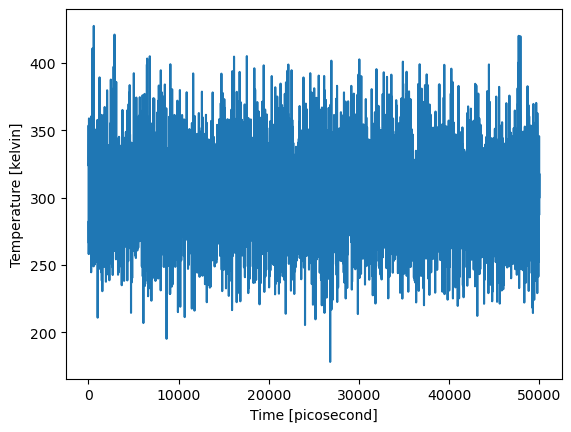
In this section, let’s suppose we have a molecular system with different structures: a molecular dynamics trajectory file, for instance.
And let’s see how the class molsysmt.basic.Iterator can be used to iterate over structural attributes such as coordinates, box or time.
For native MolSys, structural iteration reads its existing structures domain
and copies only requested coordinate blocks. Keeping all returned blocks in a
list still consumes memory proportional to the selected ensemble. The input
structure_indices chooses rows; requested structure_id values are labels,
not substitutes for those indices. Nonconsecutive and repeated indices retain
the requested traversal order. See Big Data Trajectories.
Here we have an example:
molsys = msm.systems['pentalanine']['traj_pentalanine.h5']
iterator = msm.Iterator(molsys, time=True, temperature=True)
All methods defined in the molsysmt.basic module can be invoked also from the main level of the library. Hence, molsysmt.Iterator() is the same method as molsysmt.basic.Iterator().
times = []
temperatures = []

for time, temperature in iterator:
    times.append(time)
    temperatures.append(temperature)
import matplotlib.pyplot as plt
import pyunitwizard as puw
import numpy as np

times = puw.utils.sequences.concatenate(times)
temperatures = puw.utils.sequences.concatenate(temperatures)

plt.plot(times, temperatures)
plt.xlabel(f'Time [{puw.get_unit(times)}]')
plt.ylabel(f'Temperature [{puw.get_unit(temperatures)}]')
plt.show()
The iterator includes some useful input arguments such as selection or structure_indices:
iterator = msm.Iterator(molsys, selection='group_index==3 and atom_name=="CA"',
                        structure_indices=[100, 110, 120], time=True, coordinates=True)
for time, coordinates in iterator:
    print(time, coordinates)
[1010.0] picosecond [[[0.9690295457839966 1.146891474723816 -0.1522401124238968]]] nanometer
[1110.0] picosecond [[[1.023858666419983 1.377505898475647 0.03329920768737793]]] nanometer
[1210.0] picosecond [[[0.9038813710212708 1.1570117473602295 0.03575613722205162]]] nanometer
And four iteration control arguments: start, stop, step and chunk.
iterator = msm.Iterator(molsys, start=500, stop=510, step=2, time=True)
for structure_id in iterator:
    print(structure_id)
[5010.0] picosecond
[5030.0] picosecond
[5050.0] picosecond
[5070.0] picosecond
[5090.0] picosecond
Let’s see two other examples on how to use these arguments:
iterator = msm.Iterator(molsys, start=500, stop=520, step=2, chunk=5, time=True)

for times in iterator:
    print(times)
[5010.0 5030.0 5050.0 5070.0 5090.0] picosecond
[5110.0 5130.0 5150.0 5170.0 5190.0] picosecond
my_structure_indices = [1000, 1013, 1021, 1034, 1055, 1067, 1084, 1093, 1105]

iterator = msm.Iterator(molsys, structure_indices=my_structure_indices,
                        start=2, step=2, chunk=2, time=True)

for times in iterator:
    print(times)
[10220.0 10560.0] picosecond
[10850.0 11060.0] picosecond
Finally, if no specific attribute is requested, the iterator returns molecular system objects, one per iteration, with structural attributes updated accordingly.
iterator = msm.Iterator(molsys, start=1000, stop=1006, chunk=3)
for aux_molsys in iterator:
    time, box_volume = msm.get(aux_molsys, time=True, box_volume=True)
    print(time, box_volume)
[10010.0 10020.0 10030.0] picosecond [7.999999999999998 7.999999999999998 7.999999999999998] nanometer ** 3
[10040.0 10050.0 10060.0] picosecond [7.999999999999998 7.999999999999998 7.999999999999998] nanometer ** 3
In this former case the output form was required by default as ‘molsysmt.MolSys’, but it can be change with the input argument output_form.
See also
Related Tools & References
Attributes: Describe the available topological and structural attributes in MolSysMT.
Demo Systems Catalog: Explore demonstration datasets used for testing and tutorials.
Iterator: Iterate over topological and structural attributes of a molecular system with
molsysmt.basic.Iterator.Get: Retrieve attribute values directly from a molecular system with
molsysmt.basic.get().Select: Select specific elements of a molecular system using selection syntax with
molsysmt.basic.select().