

Get distances#
Getting the distance between specific elements of a molecular system or two different molecular systems.
The function molsysmt.structure.get_distances() calculates Euclidean distances between atoms, residue groups, geometric centers, or whole systems across structures and simulation frames.
Added in version 1.0.0.
API documentation
Follow this link for a detailed description of the input arguments, raised errors, and returned objects of this function: molsysmt.structure.get_distances().
Basic usage#
Let’s show the main modes of distance calculations on a pentalanine trajectory:
import molsysmt as msm
import numpy as np
import matplotlib.pyplot as plt
molsys = msm.convert(msm.systems['pentalanine']['traj_pentalanine.h5'], to_form='molsysmt.MolSys')
Note
Demo Systems Catalog
This tutorial uses demonstration datasets provided by MolSysMT. To explore the full catalog of bundled systems, forms, and file paths, visit the Demo Systems guide.
Measuring distances across structural ensembles#
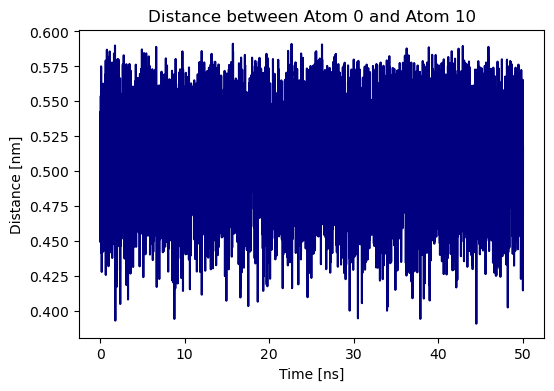
We calculate the distance between atom 0 and atom 10 along all 5000 simulation frames and plot its time series:
distances = msm.structure.get_distances(molsys, selection=0, selection_2=10)
time = msm.get(molsys, element='system', time=True)
time_ns = msm.pyunitwizard.convert(time, to_unit='ns')
plt.figure(figsize=(6, 4))
plt.plot(time_ns, distances[:, 0, 0], color='navy')
plt.xlabel('Time [ns]')
plt.ylabel('Distance [nm]')
plt.title('Distance between Atom 0 and Atom 10')
plt.show()
Measuring distances between group centroids#
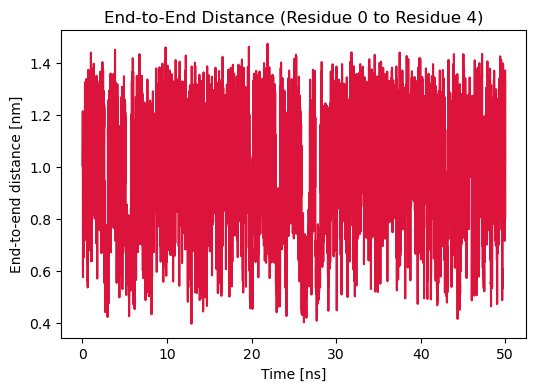
Setting center_of_atoms=True and center_of_atoms_2=True calculates the end-to-end distance between terminal residue centers:
terminal_dist = msm.structure.get_distances(molsys, selection='group_index==0', selection_2='group_index==4', center_of_atoms=True, center_of_atoms_2=True)
plt.figure(figsize=(6, 4))
plt.plot(time_ns, terminal_dist[:, 0, 0], color='crimson')
plt.xlabel('Time [ns]')
plt.ylabel('End-to-end distance [nm]')
plt.title('End-to-End Distance (Residue 0 to Residue 4)')
plt.show()
Computing pairwise distances between selections#
Setting pairs=True calculates distances strictly between the corresponding pairs \((i, j)\) without evaluating all cross combinations:
pairs_dist = msm.structure.get_distances(molsys, selection=[0, 1], selection_2=[10, 11], pairs=True)
print('Pairs shape:', pairs_dist.shape)
print('Frame 0 distances for pairs [0-10, 1-11]:', pairs_dist[0])
Pairs shape: (5000, 2)
Frame 0 distances for pairs [0-10, 1-11]: [0.5347761367899434 0.46598543834449235] nanometer
Computing full distance matrices and heatmaps#
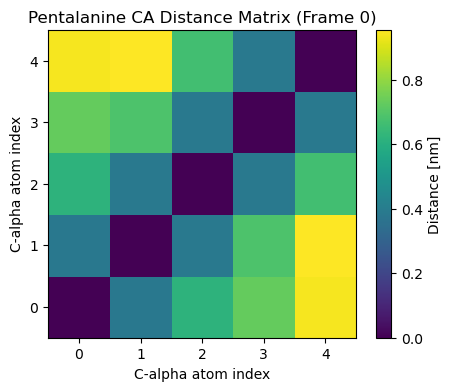
We can compute the full pairwise distance matrix for all C-alpha atoms in a given structure:
ca_atoms = msm.select(molsys, selection='atom_name=="CA"')
ca_dist_matrix = msm.structure.get_distances(molsys, selection=ca_atoms, structure_indices=0)
plt.figure(figsize=(5, 4))
plt.imshow(ca_dist_matrix[0], cmap='viridis', origin='lower')
plt.colorbar(label='Distance [nm]')
plt.xlabel('C-alpha atom index')
plt.ylabel('C-alpha atom index')
plt.title('Pentalanine CA Distance Matrix (Frame 0)')
plt.show()
Computing distances between different molecular systems#
We can also measure distances between elements of two distinct molecular systems:
molsys_A = msm.extract(molsys, structure_indices=0)
molsys_B = msm.extract(molsys, structure_indices=1000)
cross_dist = msm.structure.get_distances(molsys_A, selection='atom_name=="CA"', molecular_system_2=molsys_B, selection_2='atom_name=="CA"')
cross_dist.shape
(1, 5, 5)
See also
Related Tools & References
Convert: Convert molecular systems between different forms with
molsysmt.basic.convert().Get: Retrieve coordinates and simulation time with
molsysmt.basic.get().Extract: Extract structure frames or sub-systems with
molsysmt.basic.extract().Get minimum distances: Find minimum pairwise distances with
molsysmt.structure.get_minimum_distances().Get maximum distances: Find maximum pairwise distances with
molsysmt.structure.get_maximum_distances().Get contacts: Calculate boolean contact matrices with
molsysmt.structure.get_contacts().